feature: show native neovim marks in the VS Code gutter
Did you check the docs?
- I have read all the vscode-neovim docs
- I understand the fundamental limitations of the plugin and believe this request to be reasonable
Is your feature request related to a problem? Please describe.
When using vscode-neovim, native Neovim marks (a-z, A-Z) work correctly for jumping, but their positions are not visible in the VS Code gutter.
This makes marks much less discoverable than in workflows where marks are visually indicated. In practice, I can jump to a mark if I remember it exists, but I cannot easily see where marks are currently placed in the file.
Describe the solution you'd like
Keep the current native Neovim mark behavior exactly as it is, and add a visual indication of mark positions in the VS Code gutter.
The expected UX is a gutter visualization of marks, similar to the screenshot below:
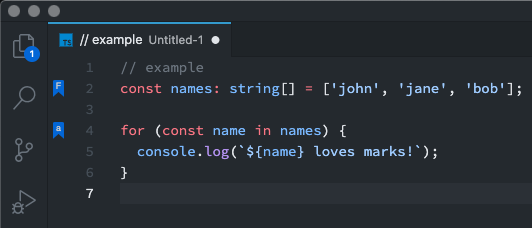
In other words, this request is not about introducing a separate bookmark system or changing how marks work.
It is only about displaying existing native Neovim marks in the VS Code gutter.
Describe alternatives you've considered
A possible implementation inside vscode-neovim could look like this:
- Keep native Neovim marks as the source of truth
- Query marks from the embedded Neovim instance (for example via
getmarklist()) - Sync the relevant marks for the active buffer to the VS Code extension side
- Render them in the VS Code gutter using decorations / gutter icons
Additional context
No response
Source: vscode-neovim/vscode-neovim