[Bug] Composer /help listing (and other popovers) paint under the session header
Description
In a session with a long skill list, /help dumps its listing inside the composer card. The card grows upward into the transparent ChatHeader overlay (absolute z-30, no paint), so the session title and header icons end up painted on top of the command text.
The same path exists for the slash menu, @ file mentions, /context and other command output, and the expanded background-task card. All of them grow upward from the composer toward the header.
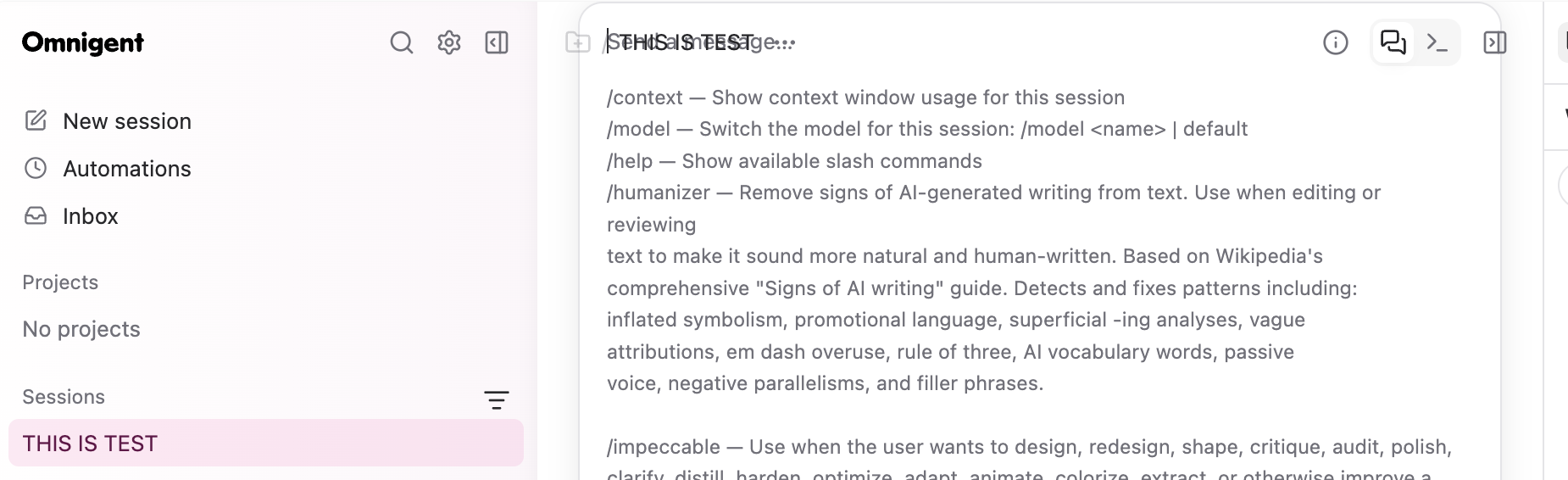
Cause: /help and command errors render in-flow (px-4 pb-2 inside the card). ChatHeader is a transparent overlay, so extra card height is still painted by the header. The slash and @ menus are z-10 with max-h-80 and no viewport cap, so a short window or a long list also crosses into the header box.
Expected: those surfaces share one popover band above the composer and below the header (z-20), cap their height with the existing design tokens (--spacing(64) / max-h-64, --omnigent-header-height), and scroll leftovers. Bare /model should also clear the draft before showing its usage hint, matching /help and /context.
Fix: #6542
Steps to reproduce
- Open a chat session that has several skills installed.
- Type
/helpand press Enter. - The listing expands the composer card. The session title and header icons sit on top of the text.
- Also check: type
/(slash menu), type@on a native session (mention list), expand a running background-task pill. On a short window they all reach the header.
Version
main as of 293b5aa79 (before #6542)
OS
macOS (web UI)
Harness
Not applicable
Harness mode
Not applicable
Platform or device
macOS, Desktop app, Other
Observed impact
Some users or sessions
Authentication type
Not authentication-related
Source: omnigent-ai/omnigent