kterm
> 编程语言gtk+ terminal emulator with embedded virtual keyboard for Kindle
About
gtk+ terminal emulator with embedded virtual keyboard for Kindle
# kterm
This is a simple GTK+ terminal emulator with embedded virtual keyboard. It is based on VteTerminal library. Some initial settings may be defined in kterm.conf file. Keyboard layouts are defined in xml config files. The keyboard config files follow the same rules as matchbox keyboard configs (backward compatible with kterm 1.x which used embedded matchbox keyboard).
Kterm has been developed for Kindle Touch. It is reported to also work on Paperwhites. Generally it should work on any platform which supports GTK+, either version 2 or 3.
On Kindle menu pops up on two fingers tap in the terminal window. On other devices on right button mouse click.
Keyboard XML config **** and attributes:
- **** - layout
- **** - row
- **** - empty spacer
- **** - key, attributes:
- extended = [true|false], optional, if true only visible in landscape mode, defaults to false;
- fill = [true|false], optional, if true button will expand to use all available space, defaults to false;
- width = [width in kterm units], optional, 1000 is standard width, 2000 will be double width key and so on; defaults to 1000;
- obey-caps = [true|false], optional, should button change on caps lock press, defaults to false;
- **** - default variant (no modifier)
- **** - shifted variant (shift/caps lock modifier pressed)
- **** - mod1 variant (mod1 modifier pressed)
- **** - mod2 variant (mod2 modifier pressed)
- **** - mod3 variant (mod3 modifier pressed)
- attributes for all variant nodes (default, shifted, …):
- display = [character|image:/path/to/image], required, character to display or image path (absolute must start with slash, otherwise relative to config);
- action = [character|special name|modifier:name], required for keys with image label, modifiers, special buttons, character sent to terminal, name of special action, or name of modifier, defaults to display attribute value;
- for a list of special key names see this lookup table; valid modifier keys are: shift, caps, ctrl, alt, mod1, mod2, mod3
Command line options:
$ ./kterm -h
Usage: kterm [OPTIONS]
        -c       color scheme (0 light, 1 dark)
        -d            debug mode
        -e   execute command in kterm
        -E       set environment variable
        -f    font family
        -h            show this message
        -k       keyboard off/on
        -l      keyboard layout config path
        -o     screen orientation (up, right, left)
        -s      font size
        -t  terminal encoding
        -u     cursor shape (block, I-beam, underline)
        -v            print version and exit
For a list of what constitutes valid encodings, check this list or the list returned by iconv -l.
Screenshots
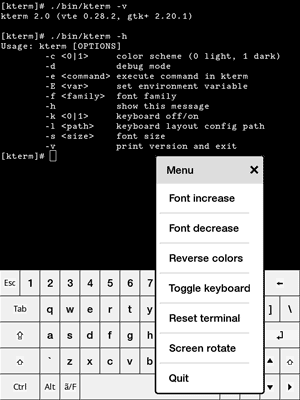
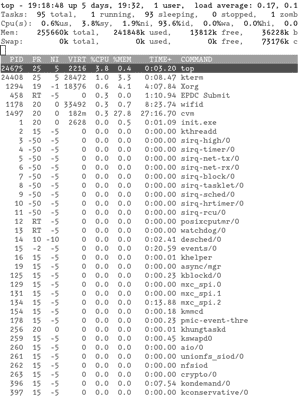
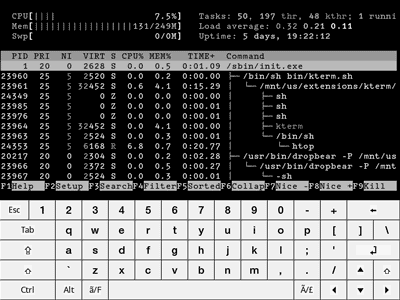
Changelog
- 2.6: option for setting cursor shape (by efskap)
- 2.5: option for setting terminal encoding (by deuill)
- 2.4: fix: some special keys won't work, add path to terminfo in Kindle start script
- 2.3: fix: issue with uneven keyboard rows height, unresponsivness when popup menu is cancelled, autotools build and other minor bugs
- 2.2: fix launching kterm with hidden keyboard; add config/command line option for screen rotation (screen orientation will also be restored to initial value after quitting kterm); fix flickering at start; remove unneeded files from kindle package, add high resolution key images; some other minor issues
- 2.1: mainly small bugfixes, compilation warnings
- 2.0: major rewrite; added native keyboard which replaces matchbox keyboard - better stability, easier to compile and maintain; updated to build on modern frameworks; added autotools project; option to rotate screen on Kindle; option to add environment variables on command line
- 0.7: keyboard layout for Paperwhite (by nasser), also larger labels for Touch keyboard
- 0.6: parameter for choosing different keyboard layout from config and command line; new keyboard layout for Touch and Paperwhite (by cubemike99 and DuckieTigger)
- 0.5: support for mouse events (for ncurses apps etc)
- 0.4: added command line options(see kterm -h), fixed colors
- 0.3: xterm-like "-e" option support (by Fvek), simple config file added, removed bug with blocked key-up event when quiting with exit command (traced by aditya3098)
- 0.2: patch for matchbox-keyboard to get rid of absolute paths in config file
- 0.1: first release
Building
- dependencies: GTK+ version 2 or 3 (use
--enable-gtk3), VTE, optionally dbus for Kindle screen rotation $ ./autogen.sh$ ./configure$ make$ sudo make install- for Kindle build use
--enable-kindle --sysconfdir=/mnt/us/extensions/ktermconfigure options. If you are cross-compiling runmake dist-kindleinstead ofmake install. It will create zip package in build directory.
Packages
- for Kindle Touch/Paperwhite are available at http://www.fabiszewski.net/kindle-terminal/
License
- GPL version 3 or (at your option) any later version
Issues· 0 open
No open issues yet, or sync has not completed.