RadialGradientBrush doesn't work when the GradientOrigin is different than the Center
Describe the bug When a RadialGradientBrush's GradientOrigin is different than the Center, the gradient doesn't work as expected - it looks like some gradient stops are lost.
To Reproduce
Add the following Grid to a Window:
<Grid>
  <Grid.ColumnDefinitions>
    <ColumnDefinition Width="1*" />
    <ColumnDefinition Width="1*" />
  </Grid.ColumnDefinitions>

  <Rectangle>
    <Rectangle.Fill>
      <RadialGradientBrush Center="50%, 50%" GradientOrigin="50%, 50%" Radius="0.25">
        <RadialGradientBrush.GradientStops>
          <GradientStops>
            <GradientStop Color="Black" Offset="0"/>
            <GradientStop Color="White" Offset="0.49"/>
            <GradientStop Color="Black" Offset="0.51"/>
            <GradientStop Color="White" Offset="0.99"/>
            <GradientStop Color="Blue" Offset="1"/>
          </GradientStops>
        </RadialGradientBrush.GradientStops>
      </RadialGradientBrush>
    </Rectangle.Fill>
  </Rectangle>

  <Rectangle Grid.Column="1">
    <Rectangle.Fill>
      <RadialGradientBrush Center="50%, 50%" GradientOrigin="40%, 50%" Radius="0.25">
        <RadialGradientBrush.GradientStops>
          <GradientStops>
            <GradientStop Color="Black" Offset="0"/>
            <GradientStop Color="White" Offset="0.49"/>
            <GradientStop Color="Black" Offset="0.51"/>
            <GradientStop Color="White" Offset="0.99"/>
            <GradientStop Color="Blue" Offset="1"/>
          </GradientStops>
        </RadialGradientBrush.GradientStops>
      </RadialGradientBrush>
    </Rectangle.Fill>
  </Rectangle>

</Grid>
Then compile and execute the program.
The problematic behaviour can be somehow mitigated by adding some additional stops at the beginning of the gradient, e.g.:
<GradientStops>
  <GradientStop Color="Black" Offset="0"/>
  <GradientStop Color="White" Offset="0"/>
  <GradientStop Color="Black" Offset="0"/>

  <GradientStop Color="Black" Offset="0"/>
  <GradientStop Color="White" Offset="0.49"/>
  <GradientStop Color="Black" Offset="0.51"/>
  <GradientStop Color="White" Offset="0.99"/>
  <GradientStop Color="Blue" Offset="1"/>
</GradientStops>
Expected behavior The two gradients should look the same, except for the origin being in a different position. Instead, it looks like some stops are missed in the gradient on the right.
Screenshots
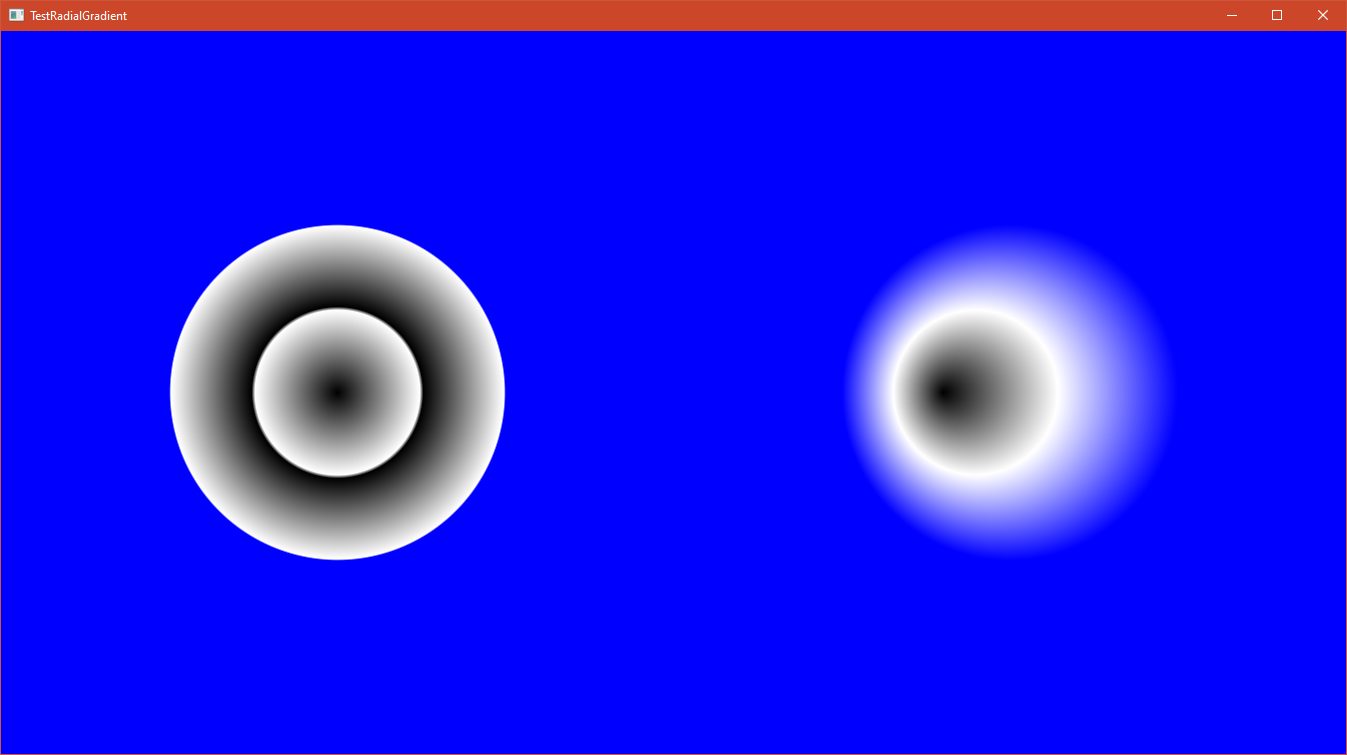
In the image on the left, the brush's GradientOrigin is the same as the Center, and the gradient appears as expected. In the image on the right the GradientOrigin and the Center differ, and the gradient doesn't look right (even though the gradient stops are the same).

Here, the correct behaviour has been recovered by adding some stops at the beginning of the gradient.
Desktop (please complete the following information):
- OS: bug happens Windows 10 and Ubuntu 20.04, I have not tested on macOS.
- Version: this happens at least on 0.9.12, 0.10.0, 0.10.3 and 0.10.6.
Source: AvaloniaUI/Avalonia