Custom Zoom Levels
I'm surprised to find that this isn't currently possible: A way to use and manage custom zoom levels.
The Zoom slider in the bottom-right lets you type in a value, but Aseprite will automatically snap to a preset zoom level. If I type in 1000%, Aseprite will round down to 800%. There's seemingly no XML that governs zoom either, so I can't manually add my own zoom presets.
(Funnily, gui.xml has a set of zoom levels starting at line 255, where there IS an entry for 1000% zoom. A keyboard shortcut can be set in this file, but Aseprite rounds zoom down to 800% again.)
On Managing zoom levels: I'd like to see a new tab in the Options window where I can add and remove my preferred zoom levels. This might be a good place to set up keyboard shortcuts for specific zoom levels as well.
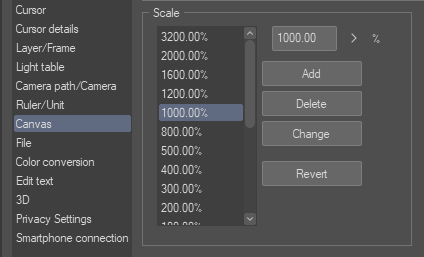
I've found these preferences useful in Clip Studio Paint (screenshot above - zoom levels only, no shortcuts). I've only had to alter this list once, but it fits my needs.
Source: aseprite/aseprite