Bug Report: MCP over OAuth 2.1 unusable against a path-scoped PRM resource (Grafana Cloud MCP), and silent in the UI
Description
An MCP server whose OAuth 2.1 Protected Resource Metadata advertises a path-scoped
resource (for example Grafana Cloud MCP, https://mcp.grafana.com/mcp, whose PRM
publishes resource: https://mcp.grafana.com/mcp) cannot be connected from DocsGPT.
Five independent defects sit on the same path. Each one is only reachable after the previous one is fixed, and the first two surface no message at all in the UI.
Defects 1–4 are backend one-liners and I have a branch with tests for them. Defect 5 touches the save route's contract and is reported here for discussion rather than patched blind.
1. The OAuth resource indicator is derived from the origin, not the endpoint.
DocsGPTOAuth.__init__ strips the path and passes only scheme://netloc to
OAuthClientProvider:
parsed_url = urlparse(mcp_url)
self.server_base_url = f"{parsed_url.scheme}://{parsed_url.netloc}"
...
super().__init__(server_url=self.server_base_url, ...)
The SDK validates in one direction only
(mcp/client/auth/oauth2.py::_validate_resource_match):
default_resource = resource_url_from_server_url(self.context.server_url)
if not check_resource_allowed(requested_resource=default_resource, configured_resource=prm_resource):
    raise OAuthFlowError(f"Protected resource {prm_resource} does not match expected {default_resource}")
check_resource_allowed requires the requested path to start with the configured
path, so a token for a parent resource may be used for its children — not the reverse.
With the origin, "/" does not start with "/mcp/" and the flow dies before any
authorization URL is produced:
Protected resource https://mcp.grafana.com/mcp does not match expected https://mcp.grafana.comThis affects any MCP server that scopes its PRM resource to a path, not just
Grafana.
2. /api/mcp_server/test drops task_id, so the consent popup never opens.
MCPTool._start_oauth_task returns success, requires_oauth, task_id, message
and tools_count — and no auth_url, because the authorization URL is only known
later and arrives over SSE. The route allowlists a field set that excludes task_id:
if k in ("success", "requires_oauth", "auth_url")frontend/src/modals/MCPServerModal.tsx gates the whole OAuth branch on it:
if (formData.auth_type === 'oauth' && result.requires_oauth && result.task_id) { ... }
else { setTestResult(result); ... }
So the response carries {"success": false, "requires_oauth": true} and falls into the
else, which stores it as the test result. That object has no message, and the
errors.testFailed string is only set in the catch branch — which does not run,
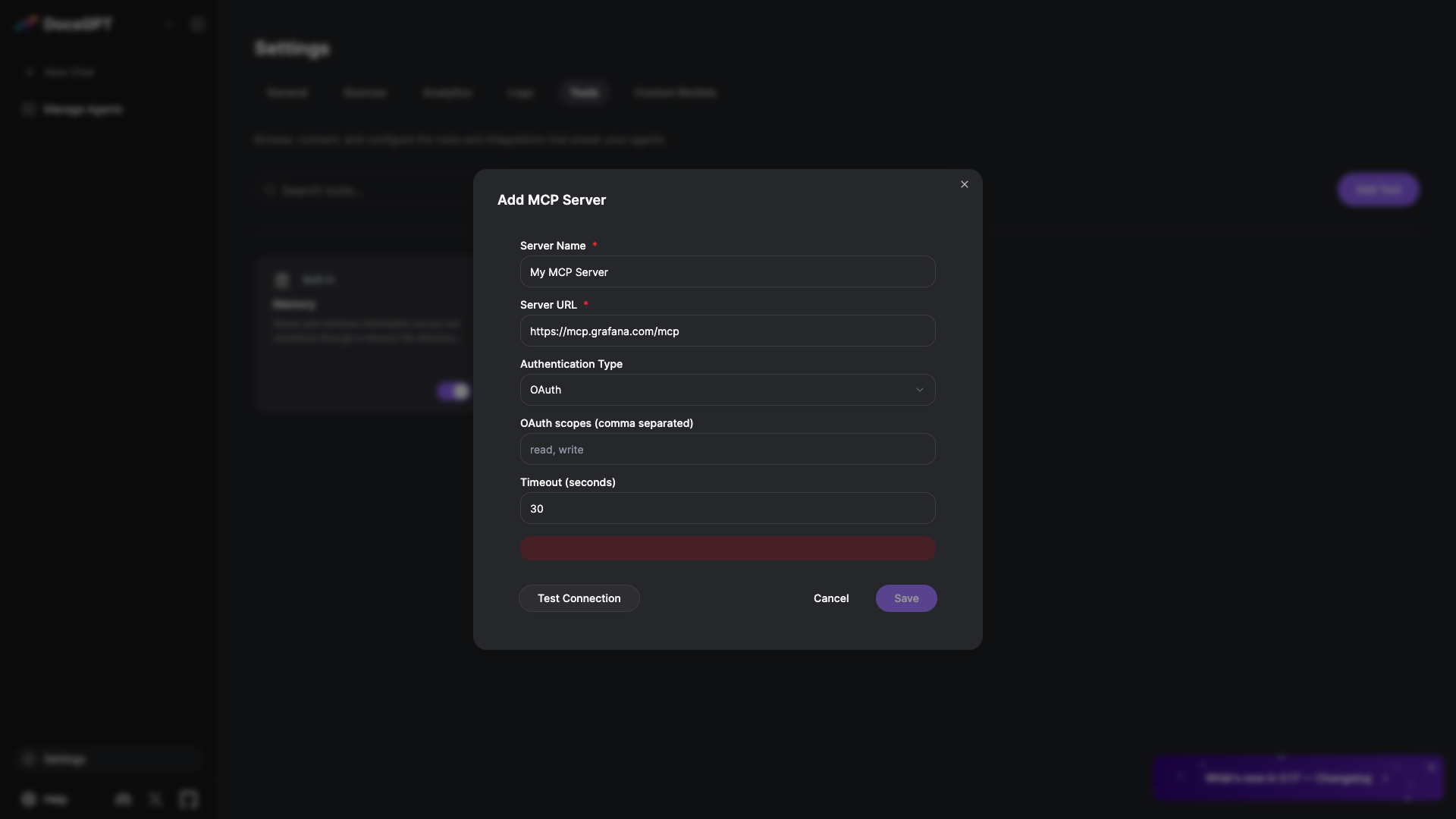
because the request succeeded with HTTP 200. The user gets an empty red error
banner: no text at all, while the Celery worker has already started a flow it can
never hand back.
3. A schema with no properties is stored as a property named type.
MCPTool.get_actions_metadata treats an inputSchema without a properties key as a
flat map of property definitions:
if "properties" in input_schema:
    ...
else:
    parameters_schema["properties"] = input_schema
{"type": "object"} is a valid MCP inputSchema meaning "this tool takes no
arguments" — Grafana Cloud MCP sends it for list_investigation_profiles among
others. It gets stored as {"properties": {"type": "object"}}, i.e. a property named
type whose definition is the string "object". The sibling case
{"type": "object", "properties": null} takes the first branch and stores
properties: None.
4. Two consumers assume every property value is a mapping.
transform_actions (application/api/user/tools/routes.py) writes into each property
definition, so saving raises and the UI shows "Failed to save MCP server":
TypeError: 'str' object does not support item assignmentToolExecutor._build_tool_parameters reads from each property definition, so the next
chat turn raises and the UI shows "Please try again later":
AttributeError: 'str' object has no attribute 'get'Because the malformed value is already persisted, fixing only defect 3 leaves existing tools broken.
5. Once a token is stored, the server can never be saved.
MCPTool._test_oauth_connection short-circuits when a token is already in storage: it
discovers the tools with that token and returns success, without going through
_start_oauth_task, so the response carries no task_id. Only when there is no token,
or it fails, is a task started.
MCPServerSave hard-requires one:
if auth_type == "oauth":
    if not config.get("oauth_task_id"):
        return make_response(jsonify({
            "success": False,
            "error": "Connection not authorized. Please complete the OAuth authorization first.",
        }), 400)
and takes actions_metadata only from the task result, never from a direct discovery.
So after the first successful authorization the two halves disagree permanently:
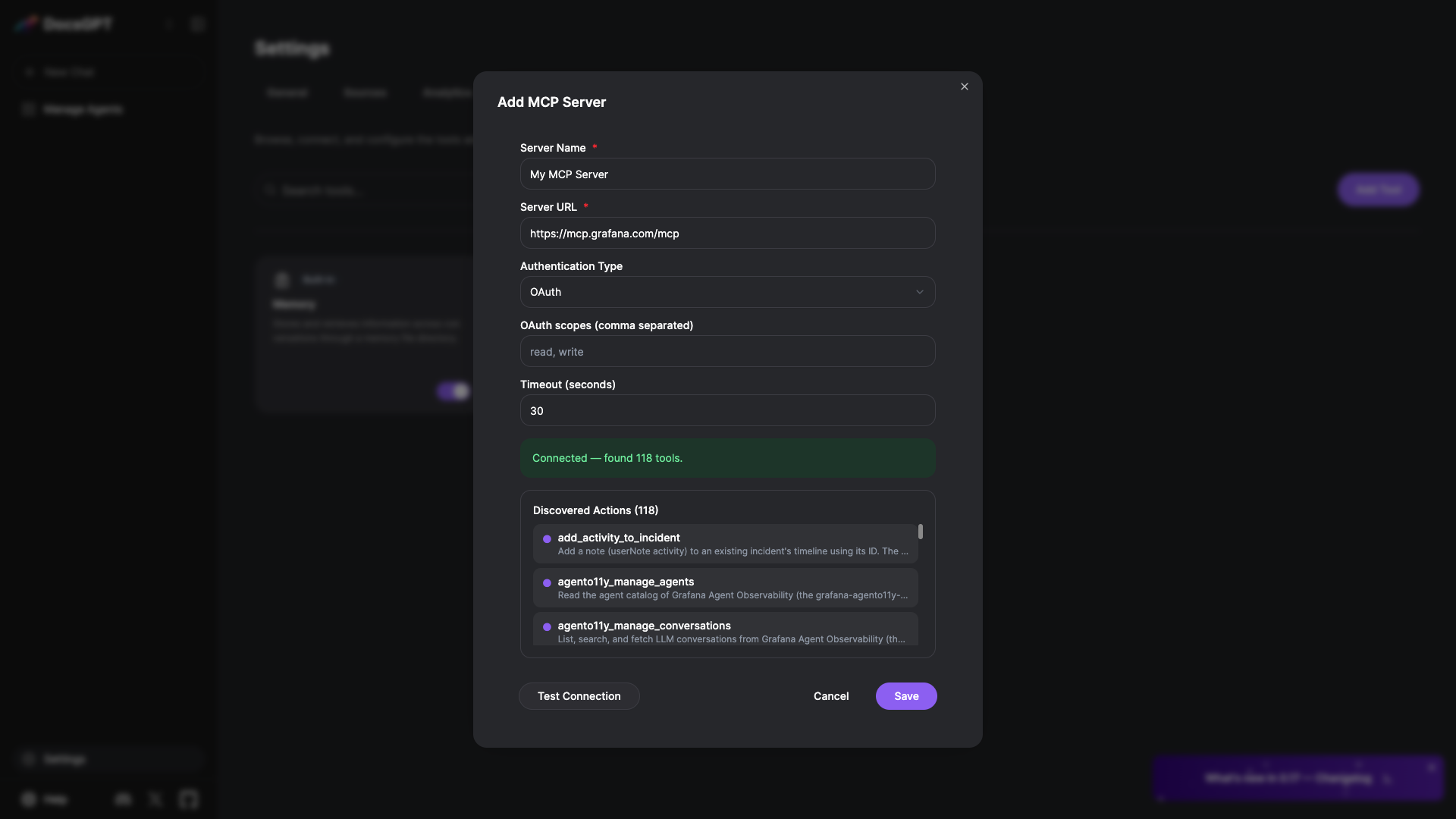
POST /api/mcp_server/test -> 200 {"success": true, "message": "Connected — found 118 tools.", "tools": [...]}
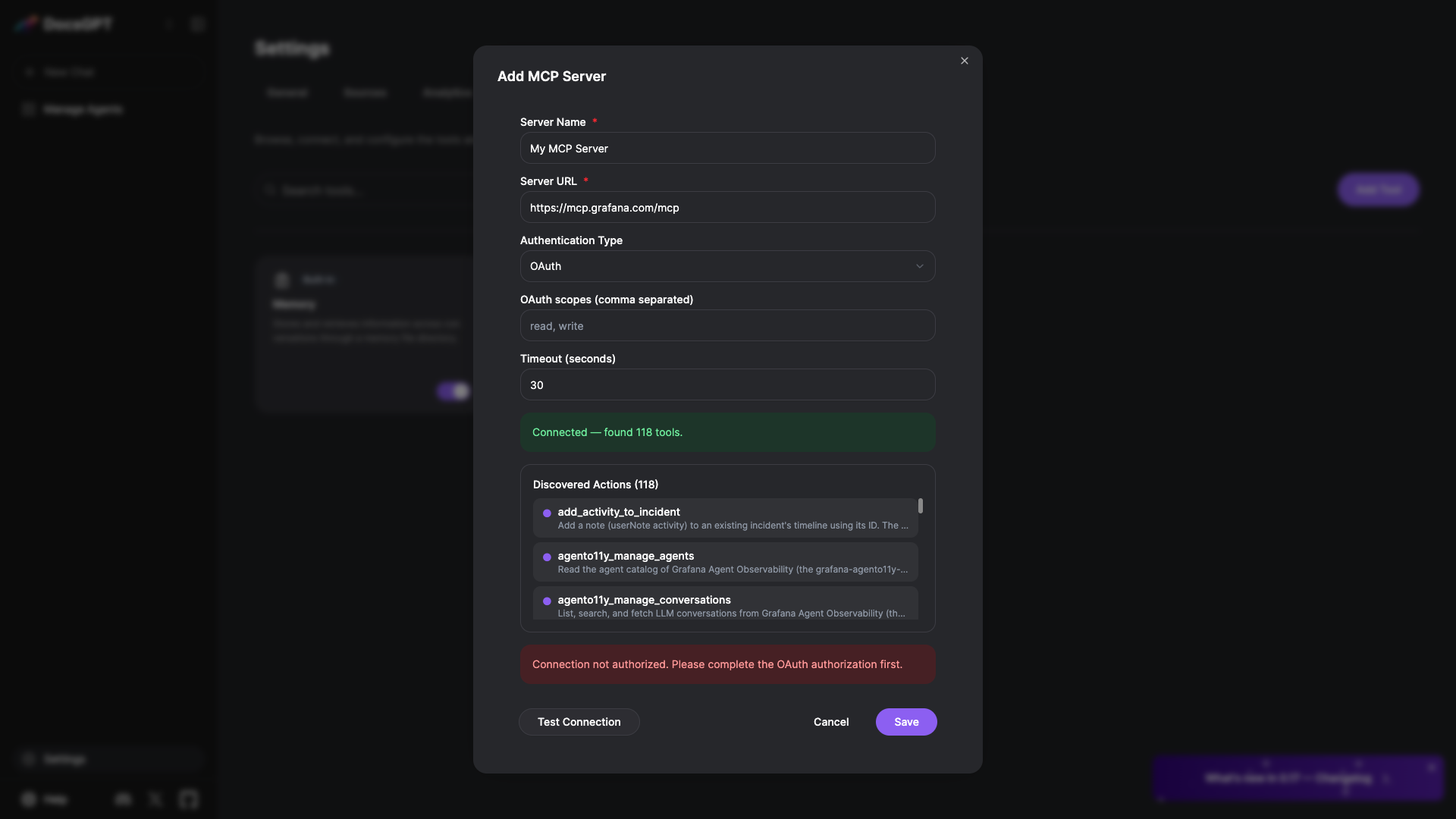
POST /api/mcp_server/save -> 400 {"error": "Connection not authorized. Please complete the OAuth authorization first."}
There is no way out from the UI: pressing Test Connection again keeps succeeding from
the stored token and keeps returning no task_id. It is reachable by simply closing the
modal after authorizing and reopening it, or by deleting the tool and adding the same
server again.
Reproduction steps
No Grafana account is needed for steps 1–3: the PRM check fails before any consent
screen. docker compose -f deployment/docker-compose.yaml up with
LLM_PROVIDER=docsgpt is enough.
- Settings → Tools → Add Tool → MCP Tool.
- In the Add MCP Server modal set Server URL
https://mcp.grafana.com/mcpand Authentication Type OAuth. Leave the rest at their defaults. - Click Test Connection.
→ UI: an empty red error banner, no text.
→
POST /api/mcp_server/testreturns200 {"requires_oauth": true, "success": false}. → Worker log:mcp.client.auth.exceptions.OAuthFlowError: Protected resource https://mcp.grafana.com/mcp does not match expected https://mcp.grafana.com - Fix defect 1 only, click Test Connection again.
→ The worker now reaches
POST /mcp/oauth/register → 201and produces an authorization URL, but the UI still shows the empty banner and no consent popup, becausetask_idnever reaches the client. - Fix defect 2 only, complete the Grafana consent screen, click Save.
→ HTTP 500,
TypeError: 'str' object does not support item assignment. - Fix defect 3 only, save succeeds for a newly added server, but any tool already
stored still raises on the next chat turn:
AttributeError: 'str' object has no attribute 'get'. - With defects 1–4 fixed and a token now stored, close the modal and add the same
server again. Test Connection reports
Connected — found 118 tools.and Save returns 400Connection not authorized. Please complete the OAuth authorization first., with no way to recover from the UI.
Defects 3 and 4 can be reproduced without the consent screen, by driving the same functions with the schema Grafana publishes:
from application.agents.tools.mcp_tool import MCPTool
from application.api.user.tools.routes import transform_actions

tool.available_tools = [{"name": "list_investigation_profiles", "inputSchema": {"type": "object"}}]
actions = tool.get_actions_metadata()
# -> {'type': 'object', 'properties': {'type': 'object'}, 'required': []}
transform_actions(actions)
# -> TypeError: 'str' object does not support item assignment
Expected behavior
Connecting an MCP server whose PRM resource includes a path completes the OAuth
flow, saves, and its tools are usable in chat. A tool that declares no arguments is
stored with properties: {}. A property definition DocsGPT cannot interpret is
skipped rather than turned into a 500. When a test fails, the UI says something. A test
that reports 118 discovered tools can be saved.
Actual Behavior with Screenshots
The five failures above, in sequence. The first two are silent: the banner that the
modal renders is empty, because the response has no message field and the
errors.testFailed string is only used for transport-level failures. The specifics
exist only in the API and worker logs.
Defects 1 and 2 on main — Test Connection renders a red banner with no text:
With defects 1–4 fixed, the same input completes the flow:
Defect 5, reached from that same state after closing and reopening the modal — the test succeeds from the stored token and the save is refused:
Operating system
Linux
What development environment are you experiencing this bug on?
Docker
Provide any additional context for the Bug.
Reproduced on main at 618079a4 with deployment/docker-compose.yaml
(LLM_PROVIDER=docsgpt, no API key), mcp SDK 1.29.1, against Grafana Cloud MCP.
Also seen on arc53/docsgpt:latest in a Kubernetes deployment.
Out of scope here, noted while tracing: MCPTool reads config["headers"], but
MCPServerModal.buildToolConfig() never sends a headers field, so custom headers
cannot be set for an MCP server from the UI.
Are you willing to submit PR?
Yes, I am willing to submit a PR!
Source: arc53/DocsGPT