Pantrybridge
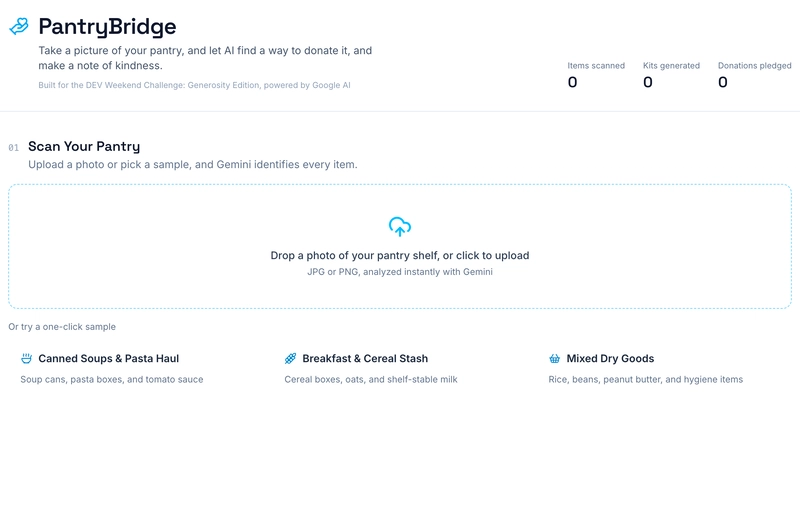
This is a submission for Weekend Challenge: Generosity Edition I wanted to build something for this challenge that didn't just talk about generosity but actually meant something, and felt beneficial. This tool can make it easier to go from "I have food to donate" to "I'm donating food". You take a picture of your pantry shelf, Gemini figures out what's actually in it, and the app turns that into a recipe for whoever receives it, a handwritten-style note of kindness, a real way to find a food bank near you, and a printable manifest to hand over at drop-off. What I Built PantryBridge is a small AI-powered toolkit for food donation. The flow is: 1. Scan your pantry. Upload a photo (or pick one of three one-click sample hauls if you don't have a pantry photo handy). Gemini does multimodal...
This is a submission for Weekend Challenge: Generosity Edition I wanted to build something for this challenge that didn't just talk about generosity but actually meant something, and felt beneficial. This tool can make it easier to go from "I have food to donate" to "I'm donating food". You take a picture of your pantry shelf, Gemini figures out what's actually in it, and the app turns that into a recipe for whoever receives it, a handwritten-style note of kindness, a real way to find a food bank near you, and a printable manifest to hand over at drop-off. What I Built PantryBridge is a small AI-powered toolkit for food donation. The flow is: 1. Scan your pantry. Upload a photo (or pick one of three one-click sample hauls if you don't have a pantry photo handy). Gemini does multimodal image analysis and returns a structured inventory: item names, categories, estimated quantities, dietary tags, urgency, and packaging condition. (Sorry, GIPHY messed up my gif) 2. Review the inventory. Everything shows up in a clean table with donation-readiness stats and a volunteer tip generated specifically for that haul. (If you need to, you can delete or add items!) 3. Find a real drop-off location. Enter your zip code and the app confirms your city/state (via a real geocoding lookup) and links you straight to Feeding America's actual food bank locator, so you're finding a real place to donate, not a mock one. 4. Get a recipe and a kindness note. Gemini writes a short recipe using mostly what you're donating, plus a genuinely warm, non-patronizing note to include with the box. 5. Print a donation manifest. A little printable card with the itemized contents and a mock barcode/QR for quick intake logging, with confetti when you pledge or print. Demo Try the Live App If you'd rather run it yourself: Drop a into to hit the real Gemini API. Without one, every route quietly falls back to realistic mock data instead of erroring out, so the app is never actually broken, it's just running on canned data until you add a key. Code 780s / pantrybridge A submission to the DEV.to Generosity Weekend Challenge PantryBridge AI-powered food donation and mutual-aid toolkit built for the DEV Weekend Challenge: Generosity Edition (Best Use of Google AI). Snap a photo of your pantry shelf and PantryBridge uses Gemini to detect items, match them against local food bank shortages, generate a family recipe from the donated staples, write a heartfelt kindness note, and produce a printable donation manifest. Getting Started Open http://localhost:3000. Google AI (Gemini) integration Add your key to : Without a key, both API routes (, ) gracefully fall back to realistic mock data, so the app is always fully demoable. Project structure — multimodal pantry photo analysis (Gemini 3.6 Flash) — recipe + kindness note generation — UI building blocks (uploader, inventory table, matcher, recipe/kindness cards, printable manifest) — Gemini client, mock data/fallbacks, food-bank matching logic View on GitHub How I Built It It's a Next.js 16 (App Router) app with Tailwind v4 and shadcn/ui, talking to Gemini through . A few decisions I'm actually proud of, past the obvious "call Gemini with a prompt" version: The vision prompt is opinionated, not just "list the items." Early on, Gemini would miss stacked items, double-count identical products, or slap dietary tags on things it couldn't actually justify. I rewrote the prompt as an explicit rulebook: scan the whole frame including backgrounds, group identical products into one entry with an accurate count instead of five duplicate rows, only tag something "Gluten-Free" if the packaging says so or it's an unambiguous fact about that exact product, and never invent an item that isn't visible. I also switched to Gemini's structured instead of just asking nicely for JSON, so the output is actually guaranteed to match the app's types instead of occasionally almost matching them. The food bank feature used to be fake, and I fixed that. My