Link to the Source Code As a data engineer, I spend my days designing clean, optimized data structures.
But at home, I face a much tougher crowd: my family.
We manage our shared finances together to optimize our budget, and because of where we live and work, we have to do this in several different currencies (like USD, EUR, CZK, and UAH) Like any developer, I first tried to find a ready-made app to solve this.
But I ran into a classic problem: they were either bloated with a million features we didn’t care about, or they were missing the exact features we actually needed.
So, we did what any desperate family does: we opened a Google Sheet.
We tracked our money there for a while, not because it was perfect, but because it helped us figure out what we actually needed from a real application.
It was our "living schema design" before I wrote a single line of code.
In this article, I want to show you how I looked at this problem from two sides—as a frustrated user who just wants to log expenses, and as a data engineer obsessed with clean database design.
Here is the story of how I built our custom home accounting server.
Part 1: Django, a Star Schema, and the Framework Battle By 2025, I was ready to replace our Google Sheet.
My main programming language is Python, so I had three realistic choices: FastAPI, Flask, or Django.
FastAPI is the cool kid on the block for high-speed APIs, but we didn’t expect millions of requests (unless my family suddenly grew by a factor of a million).
We also needed a friendly web UI, which FastAPI isn't naturally built for.
I had just used Flask for my previous project, but I wanted to challenge myself and learn something new.
Django felt like an old friend I hadn't seen in years.
It has amazing built-in tools (like the admin panel and great translation support), and using it was the perfect way to refresh my skills and grow as a developer.
The Database: Why a "Star Schema" Actually Makes Sense As a data engineer, I didn’t want a messy database.
I decided to use a Star Schema, which is usually used in big data warehouses, but is actually perfect for transaction bookkeeping.
Think of it like this: the central table is the star of the show, and everything else just adds context.
The Fact Table (): This is where all the action happens .
I used a simple sign rule: income is recorded as a positive number, and expenses are recorded as negative numbers.
It's simple, mathematically clean, and makes calculations incredibly easy.
The Dimension Tables: These surround the transaction table and hold details like , , , , and .
By late 2025, I had built the database, a simple web UI, an API, tests, and manuals.
I packaged it into two Django apps— and —and hosted it locally on an Ubuntu server running Gunicorn.
It worked beautifully, but I was not done yet.
Part 2: 2026 Evolution — Going Serverless and Banishing "Boring Manuals" In 2026, I looked at the 10-page text manuals I had written for my family.
Let's be honest: nobody—especially your family—wants to read a dry technical guide just to find out how to log a credit card transfer.
I decided to do two things: make the app Serverless and replace the boring manuals with a friendly, conversational AI assistant.
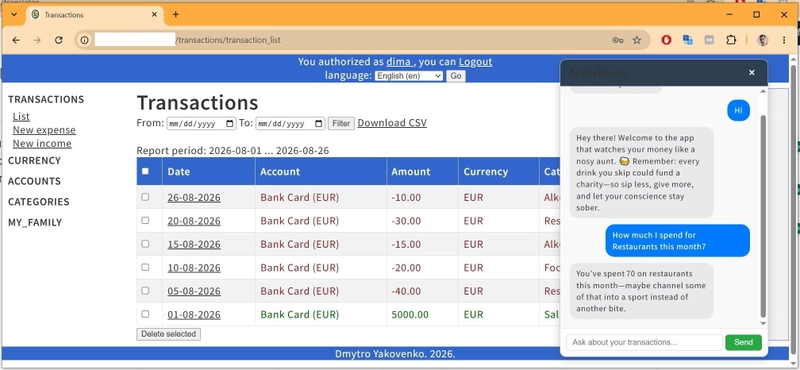
To do this, I built a third Django app called .
But I didn't want a generic chatbot that just parroted generic answers.
I wanted a smart assistant that knew exactly what the user wanted.
So, I designed it to instantly classify user messages into four distinct intents: GENERAL: For casual financial chats and friendly greetings.
DOCUMENTATION (RAG): If a user asks "How do I add a new currency?", the AI runs a search (Retrieval-Augmented Generation) across our markdown manuals to give a step-by-step answer.
DATA (Text-to-SQL): This is the magic part.
If you ask, "How much did I spend on food this month?", the AI translates your natural language question into a clean SQL query, runs it against the database, and gives you the exact answer.
COMMAND: I wanted to keep