How to Deploy a Web Project with Tencent EdgeOne Makers Using GitHub
Deploying a web project can sometimes feel complicated, especially when you have to configure servers, upload files, and manage deployment manually. Fortunately, Tencent EdgeOne Makers provides a much simpler workflow. If your project is already stored on GitHub, you can connect your GitHub account, select your repository, and deploy it with just a few steps. In this article, I’ll show you how to deploy a web project using the GitHub integration in EdgeOne Makers. 1. Prepare Your Project on GitHub Before starting, make sure your website or project has already been uploaded to a GitHub repository. For example: For a simple HTML, CSS, and JavaScript project, you can directly upload these files to GitHub. If you are using a framework such as React, Vue, or Vite, make sure your repository...
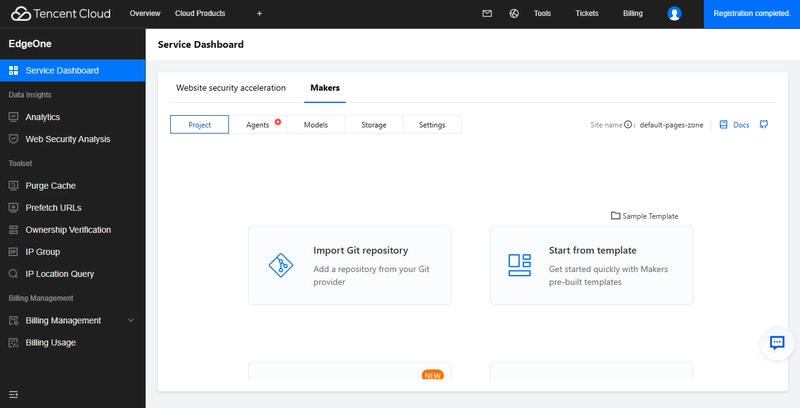
Deploying a web project can sometimes feel complicated, especially when you have to configure servers, upload files, and manage deployment manually. Fortunately, Tencent EdgeOne Makers provides a much simpler workflow. If your project is already stored on GitHub, you can connect your GitHub account, select your repository, and deploy it with just a few steps. In this article, I’ll show you how to deploy a web project using the GitHub integration in EdgeOne Makers. 1. Prepare Your Project on GitHub Before starting, make sure your website or project has already been uploaded to a GitHub repository. For example: For a simple HTML, CSS, and JavaScript project, you can directly upload these files to GitHub. If you are using a framework such as React, Vue, or Vite, make sure your repository contains the required project files, including package.json. 2. Open Tencent EdgeOne Makers Go to Tencent EdgeOne Makers and sign in with your account. From the Makers dashboard, choose the option to create a new project. Instead of uploading your files manually, select the option to import a project from a Git repository. This is one of the most convenient features because EdgeOne Makers can connect directly to your source code repository. 3. Connect Your GitHub Account Select GitHub as your Git provider. You will then be asked to authorize EdgeOne Makers to access your GitHub account. Follow the authorization process and give the required permissions. After your GitHub account has been connected successfully, Makers will be able to display the repositories that are available to your account. 4. Select Your Repository Now choose the GitHub repository containing your web project. After selecting the repository, EdgeOne Makers will analyze the project and determine the appropriate deployment configuration. For common frameworks, Makers can automatically identify the framework and provide suitable build settings. 5. Deploy Your Project Once the repository has been selected, review the deployment configuration and click Deploy or Start Deployment. EdgeOne Makers will retrieve the source code from your GitHub repository and begin the deployment process. You can monitor the deployment status directly from the Makers dashboard. When the deployment finishes successfully, Makers will provide a URL that you can use to access your website. And that's it! Your project has now gone from GitHub → EdgeOne Makers → Live Website without requiring you to manually upload the website files. 6. Updating Your Website One of the best parts of this workflow is that you don't have to repeat the entire deployment process every time you make a change. Simply modify your project, commit the changes, and push them to the connected GitHub repository. For example: git add . git commit -m "Update website" git push With the Git-based deployment workflow configured, a new deployment can be triggered when changes are pushed to the relevant branch. Conclusion Deploying a website with Tencent EdgeOne Makers can be extremely simple when your project is already hosted on GitHub. Instead of manually uploading files and configuring a server, you can connect your GitHub account, select your repository, and deploy. This makes EdgeOne Makers a convenient solution for developers who want a straightforward deployment workflow while keeping their source code and development process on GitHub.